

Buying a SIM Card or eSIM for Travel in New Zealand
Articles on this site contain affiliate links, meaning I may be compensated if you buy a product or service after clicking them. The full privacy & disclosure policy is here.
The home of bungy jumping, hobbits, and the famous All Blacks, New Zealand’s laid-back culture and stunning natural beauty make it a huge hit with overseas visitors. Until fairly recently, though, those visitors were less impressed when it came time to get online.
Staying connected in the country used to be a costly, frustrating exercise. Wi-Fi was slow and rarely free, even in hotels, and most cell plans had high prices and tiny data allowances.
I grew up in New Zealand, but it wasn’t until I returned as a tourist that I noticed how much more expensive it was to get online there at the time than, well, almost anywhere else I’d been.
Things have thankfully changed since then. The rollout of fibre networks and unlimited broadband plans in the last few years has dramatically improved the Wi-Fi situation, and a little competition has helped bring prices down in the cellular market as well.
While you still won’t be amazed by the cost or coverage, things are much better for international visitors than they used to be. Here’s what you need to know.
Companies
There are three mobile networks in New Zealand. Spark and One have the largest networks, both covering around 98% of the population. 2degrees has a smaller coverage area, but customers roam for free on the One network as needed.
Don’t expect to get service everywhere regardless of which network you’re on, however. The country’s geography and lack of population density leave plenty of blank spots on all networks.
Competition is limited between the three companies, with similar, fairly-expensive prices across the board. Little differences help swing the balance one way or another.
If you’re flying in from overseas, you may be able to save money by buying your SIM in the duty-free area. At Christchurch, Auckland, and potentially other airports, you can pick up travel SIMs from One or Spark at tax-free prices. This means you won’t pay the 15% GST on whichever package you go for.
Spark also owns the Skinny brand, which has competitive pricing for prepaid users, especially those who use a lot of data. With a slick website and app that makes life unusually easy for international visitors, it’s definitely a good option.
Because I return to New Zealand regularly to visit family, I’ve used SIMs from all of the providers at various times. I’ve mostly gone with One and Skinny in the past, but switched to a travel eSIM for my last couple of visits.
It saved both money and time, so it’s what I’ll be doing for future trips as well, especially if I’m only visiting for a few days or weeks.
Travel eSIM for New Zealand
On my most recent couple of trips, I’ve only been visiting for two or three weeks at a time. The tourist SIM options I mention above aren’t great for shorter trips like these, so I’ve gone with travel eSIMs instead, trying out service with a few of the companies I use most often around the world.
Of those, aloSIM has consistently provided the best value for money, so that’s who I’d recommend you go with. That’s not a big surprise: I’ve used them in at least a dozen other countries as well, and they’ve almost always outperformed the competition.
I talk more about speeds and coverage at the end of this article, but for now, suffice it to say that of the three eSIM providers I’ve used (aloSIM, Airalo, and Ubigi), aloSIM had the fastest speeds anywhere and everywhere I’ve tested them.
If you’re new to eSIMs, they offer big benefits to travelers in terms of how quickly, easily, and (often) cheaply you can get connected when you arrive in a new country. Most recent phones support them.
Going to other countries as well? Be sure to check out my quick and easy eSIM finder with real-world recommendations for every trip: it only takes a few seconds, and could save you a ton of money!
For my most recent three-week trip, aloSIM had the cheapest pricing for a useful amount of data. I paid $11 USD for 3GB of data, valid for 30 days.
If I’d needed more, I could have bought anything up to 20GB valid for a month, but at that point I wouldn’t have been saving anything versus the local providers.
As usual with most travel eSIMs, it was data-only: you don’t get a local number, although there is the option of a free US or Canadian number if you want it (I didn’t).
I just used WhatsApp for calling and texting friends and family, and Yadaphone for the couple of times I needed to call an actual phone number. If you want a New Zealand phone number, though, you’ll need to buy from one of the local companies mentioned above.
Service with aloSIM was on the One network, and was fast and reliable throughout my stay.
While aloSIM has fitted my needs the best, your requirements might be different: Nomad is generally the best option if you need a lot of data, for example, while Instabridge only has a small number of plans, but if they fit your needs it can be the cheapest of the lot.
Here’s how the companies I’ve used and would recommend stack up.



| Package Name | Validity | Data | Price (USD) | |
|---|---|---|---|---|
| 🌐 | Global 1GB - 7 days (148 countries) | 7 days | 1GB | $10 |
| Global 1GB - 7 days (148 countries) | ||||
| 🌐 | Global 2GB - 15 days (148 countries) | 15 days | 2GB | $18 |
| Global 2GB - 15 days (148 countries) | ||||
| 🌐 | Global 3GB - 30 days (148 countries) | 30 days | 3GB | $26 |
| Global 3GB - 30 days (148 countries) | ||||
| 🌐 | Global 5GB - 30 days (148 countries) | 30 days | 5GB | $35 |
| Global 5GB - 30 days (148 countries) | ||||
| 🌐 | Global 10GB - 30 days (148 countries) | 30 days | 10GB | $50 |
| Global 10GB - 30 days (148 countries) | ||||
| 🌐 | Global 20GB - 30 days (148 countries) | 30 days | 20GB | $62 |
| Global 20GB - 30 days (148 countries) | ||||
| 🌐 | Australia and Nz 1GB - 7 days (2 countries) | 7 days | 1GB | $10.50 |
| Australia and Nz 1GB - 7 days (2 countries) | ||||
| 🌐 | Australia and Nz 3GB - 30 days (2 countries) | 30 days | 3GB | $21.50 |
| Australia and Nz 3GB - 30 days (2 countries) | ||||
| 🌐 | Australia and Nz 5GB - 30 days (2 countries) | 30 days | 5GB | $35 |
| Australia and Nz 5GB - 30 days (2 countries) | ||||
| 🌐 | Australia and Nz 10GB - 30 days (2 countries) | 30 days | 10GB | $50 |
| Australia and Nz 10GB - 30 days (2 countries) | ||||
| New Zealand 1GB - 7 days | 7 days | 1GB | $4.50 | |
| New Zealand 2GB - 15 days | 15 days | 2GB | $7.50 | |
| New Zealand 3GB - 30 days | 30 days | 3GB | $10 | |
| New Zealand Unlimited - 3 days | 3 days | Unlimited | $11.50 | |
| New Zealand 5GB - 30 days | 30 days | 5GB | $15 | |
| New Zealand Unlimited - 5 days | 5 days | Unlimited | $19.50 | |
| New Zealand 10GB - 30 days | 30 days | 10GB | $26 | |
| New Zealand Unlimited - 7 days | 7 days | Unlimited | $27 | |
| New Zealand Unlimited - 10 days | 10 days | Unlimited | $35 | |
| New Zealand 20GB - 30 days | 30 days | 20GB | $38 | |
| New Zealand Unlimited - 15 days | 15 days | Unlimited | $49 | |
| New Zealand Unlimited - 30 days | 30 days | Unlimited | $72.50 | |

How to Buy a Prepaid SIM Card in New Zealand
Skinny
If you’ve got a New Zealand address to use, you can order a Skinny SIM online and have it delivered within a day or two. If not, you can pick one up at most supermarkets, large stationery and electronics stores, and other retail chains in every decent-sized town throughout the country.
With family in New Zealand, I opted for the online ordering option. I needed to pick a call and data package along with the SIM when placing the order, and the kit arrived the following day. After inserting the SIM, I dialled ‘456’ to activate it. No passport or other identification was needed.
The Skinny website is slick and easy to use, and it lets you top up using an international credit card without issue. There’s also a comprehensive app that lets you quickly choose prepaid bundles and monitor your usage.
If you want a Skinny SIM as soon as you land, you can get them from the Paper Plus store at Queenstown airport, but I haven’t come across them at any other New Zealand airports.
Need travel insurance for New Zealand?
Need travel insurance for New Zealand?
One
After arriving on an international flight at Christchurch Airport, you’ll find kiosks selling One and Spark tourist SIMs in a sad little corner prior to baggage reclaim. They were there in early 2020, disappeared during the pandemic, but are now back again in the same place. It’s like they never left.
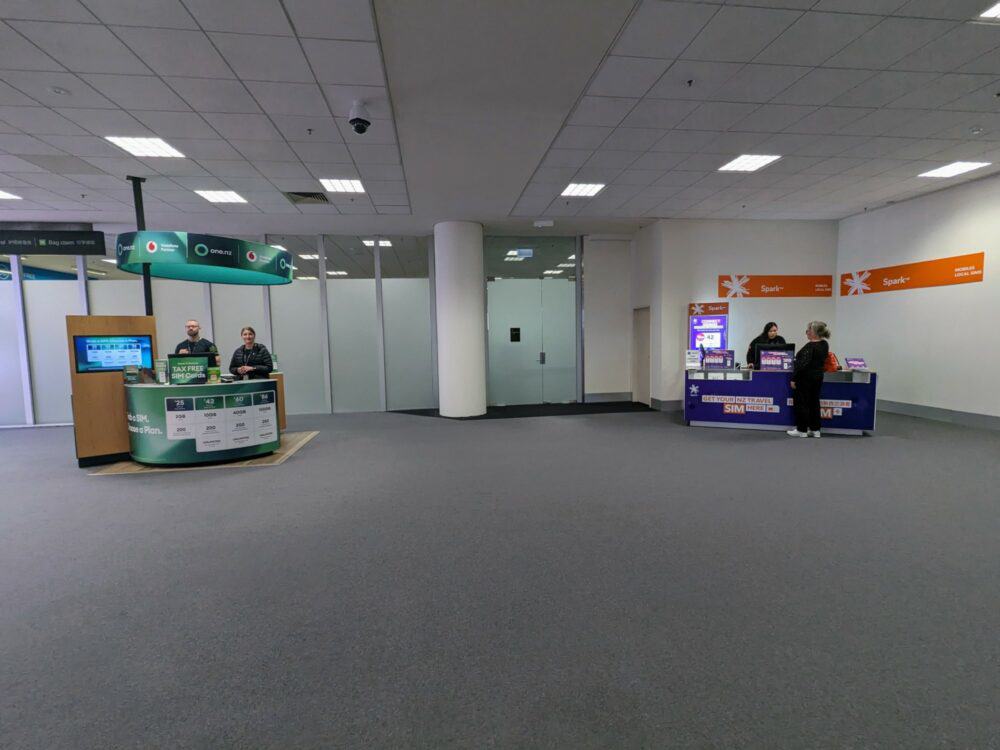
Because you technically haven’t arrived in the country yet, you get tax-free pricing if you buy your SIM card here. That saves 15%, but you only can only buy the tourist-focused packages: they may suit your needs, but if not, you’ll need to wait until you get into town.
The staff at the One kiosk have always been very efficient, taking payment and switching SIMs for me within a couple of minutes. They only sell physical SIMs there, but you can buy eSIMs from the One website in advance if you want to. You don’t benefit from tax-free pricing that way, however.
One stores are also available in the duty-free area at Auckland airport, plus the main arrivals area at Auckland, Wellington, Christchurch, and Queenstown airports, and in towns and cities around the country.
Spark
As well as that kiosk at Christchurch Airport, Spark has one at the airport in Auckland as well, and you’ll also find them in towns and cities all over the country.
On a previous trip, to ensure at least one of us would have coverage in most parts of the country, my partner bought a Spark SIM at Christchurch Airport while I was buying my One version. The process was near-identical, and took almost exactly the same length of time.
New on my most recent trip was the option of buying both eSIM and physical SIMs at the Spark kiosk. The price doesn’t change, just the process of installing it, but it was still good to see.
Online ordering to a New Zealand address is available with both Spark and One, and you’ll also often see their SIMs being sold in supermarkets, petrol stations, and elsewhere. You’re not going to have a hard time getting hold of one!
Prepaid SIM Costs
One
One and Spark’s travel SIMs are quite similar, although you’ll get longer validity with the Spark plans: they all last three months, while One’s smaller plans only last 1-2 months.
For NZ$29 with One, you get 2GB of data, plus 200 minutes and texts to New Zealand and some other countries, valid for a month. Paying NZ$49 pushes the data allowance to 10GB, increases the validity to two months, and gives unlimited calls and texts to local and Australian numbers plus 200 minutes and texts to certain other countries.
A NZ$69 package is also available, which give 40GB of data, unlimited calls and texts to NZ and Australian numbers, and 200 minutes/texts to those selected international destinations. Bump it up to NZ$99, and you’ll get 100GB and 250 minutes/texts to those overseas countries.

Like I mentioned earlier, you’ll be able to save 15% on a One tourist SIM if you buy it before clearing immigration and baggage reclaim. You can see that discount reflected in the photo above.
Spark
With Spark, NZ$29 gives you 2GB of data, 200 minutes and texts within New Zealand, plus 100 international calls and texts to various countries, valid for 90 days.
The NZ$49 package ups the data allowance to 10GB, adds unlimited calls and texts to NZ and Australia, and doubles the number of calls and texts to other (selected) international destinations.
You’ll get 50GB of data for NZ$79, and an unlimited data plan for NZ$129. With the latter, though, your speeds drop dramatically after the first 120GB. It also bumps up the international minutes/texts to 300 of each.
All of Sparks plans have a 90-day expiry.

While most of the included international calling and text destinations are the same for both companies, there are a few differences. Check the exact details beforehand if you plan to call or text back home.
Finally, if you only want data without a local number, there are some eSIM-only plans that cover that. The smallest package costs NZ$29 and gives 5GB for 90 days, going up to 100GB for NZ$89. The travel eSIM companies are usually cheaper, at least at the lower end, but feel free to compare the difference.
As with One, you’ll save 15% if you buy your Spark SIM while still airside (shown above).
Both companies have apps to track usage and more, although neither is particularly good.
Skinny
Skinny doesn’t have specific travel SIM plans: you’ll just buy one of its standard call, data and text packages.
If you’re in New Zealand for a week or less, the best option is the 7 day plan with unlimited data (25GB at max speed, much slower after that) and unlimited calls and texts to NZ and Australian numbers. It costs NZ$20.
If you’re there for longer, look at the 28-day or year-long plans instead. While you can get a very basic monthly package for as little as NZ$8, the best value is in the larger packs.
On an earlier trip, I went for the NZ$27 4-week ‘Ultra Combo’, with 300 calling minutes and unlimited texts to New Zealand and Australian numbers, plus 4GB of data that rolled over to the following month if not used.
If you choose that plan but need a bit more data, you can buy add-ons: an extra 1GB costs NZ$10, 2GB for NZ$15, and 5GB for NZ$30. Skinny also has an interesting “binge” option, where for a few bucks, you can buy up to 48 hours of unlimited data on top of whatever package you’re using.
That’s particularly useful when you find yourself somewhere with no, unusable, or expensive Wi-Fi, which still happens more often than you’d hope. If you’re a heavy data user, Skinny also has “unlimited” plans, ranging in price from NZ$40–70. Data speeds are reduced after a certain specified threshold, however.
The long and the short of it is that you’ll often get more for your money with Skinny than other providers. It’s also worth checking the site for promotional offers, as they change regularly.
Topping Up
Skinny
You can top up with a credit card on the Skinny site or app. As mentioned, international cards work fine, so this is likely the easiest way to do it.
If that doesn’t work for you, top-up vouchers are available anywhere you see the Skinny logo. There are thousands of retail outlets across the country, so you’ll find one almost anywhere you’re likely to be.
Once you’ve got a voucher in hand, you can add the credit via the app, website, calling 204, or dialling *888#.
One and Spark
Since most visitor SIM packages last three months, you may not need to top up unless you’re on a particularly long trip, or burn through your data, call, or text allowance.
If you do, you’ll need to choose an add-on pack containing more of whatever you need. To do so, add credit either by purchasing a voucher from anywhere displaying the company logo or via the One or Spark website.
Once you’ve loaded credit onto your account or pre-registered a debit or credit card, you can then select an (overpriced) add-on via the app or by texting a specific code.
As an example, you can buy 2GB of data for NZ$20 with One by texting ‘BUY EXTRADATA’ to 756, or for NZ$25 with Spark by texting ‘BUY 25DATA’ to 258.
Note that once the initial validity period is up, you can’t renew the call/text/data packages with either company. The SIM card is still active, however, and you can buy add-ons to keep you going a bit longer.
Check out the list of available add-ons for Spark here, or for One here.
aloSIM
Topping up with aloSIM is done through logging into the website or app. You just select your New Zealand eSIM, hit the top-up button, and pick the amount of data you want from 1GB to unlimited. All of the top-up packs have exactly the same pricing and duration as the original eSIMs.
Get regular travel, hiking, and tech updates from me
News, reviews, guides, and more, from here and around the web
Coverage and Data Speeds
Data speeds were good, even in relatively small towns. With Skinny, I consistently saw LTE download speeds of over 50MB/sec. With One, that jumped to over 100Mbps at times.
My aloSIM eSIM used the One network, with similar download speeds to a physical SIM. Upload speeds were a bit more hit and miss: sometimes they were about the same as a One SIM, other times they were quite a bit slower.
Airalo, Ubigi, and Nomad all had slower download speeds than aloSIM: Airalo, in particular, was a lot slower everywhere I tested it. Upload speeds didn’t vary as much.
On all networks, though, cell service often disappeared while driving between smaller destinations and when hiking on several trails throughout the South Island. As mentioned, you won’t get 100% coverage with any provider in New Zealand, especially in more remote areas.
Check the network maps (Spark, One, 2degrees) if you’re concerned about having service in specific locations.
If you know you’ll be going somewhere that your main SIM or eSIM provider doesn’t cover well, it might be worth picking up an eSIM with a small data pack from a company that uses a different network and switching as needed. The table below summarises which eSIM company uses which network:









Hi! I’m a foreign student who will be arriving in Aukland this month (and will be staying for at least a yr). I have no idea which provider to approach when I get there (and how and where) I need first of all a sim card, minimal call and text and substantial mobile internet access. What do you suggest for me?Thanks
I’d suggest walking into the retail stores operated by the major NZ cell companies (Spark, Vodafone and 2degrees) and just asking them — they’ve all got a presence in downtown Auckland. Compare whatever deals Skinny offers at the supermarket etc (you’ll find them everywhere), and go with whatever best meets your needs.
I think Spark is the current winner. Same prices as Skinny, but you get 1GB free wifi every day as well, and these wifi stations are put in most old payphone booths.
I picked up the sim at the airport and it took just minutes to get set up and ready to go. Surprising to say the least.
Hi Dustin, could you share whether you bought the Spark sim card online before you reached NZ or purchased it directly at the airport? Thanks.
Hi Guys, I am a technically challenged person (from South Africa) who will be visiting NZ for 1 month (North & South). I will need a local sim card for the following; Internet Data, Whats App, Google Maps and the odd call. We are landing in Auckland for the start of our adventure.
What would you suggest I do when I arrive at airport?
Both Spark and Vodafone have booths at the airport, so to keep things simple, I’d suggest just buying a SIM from one or the other. Pricing is similar — the most useful tourist SIM pack costs around $50 NZD for 3GB of data, plus enough calls and texts for your needs. Usefully for you, the included calls and texts are also valid for South Africa (and a handful of other countries).
As long as you don’t go overboard with your web browsing etc, that’ll be enough data for the month. Spark also gives you WiFi access at its telephone booths across the country, up to 1GB per day for free.
The salesperson should offer to set it up for you if you’re not comfortable doing so yourself.
I have an ATT provider with aniPhone 6s . Will I be able to use a locally purchased sim card in my phone?
Yes, as long as the phone’s SIM card slot isn’t locked to AT&T. If you don’t know whether it is or not, you’ll want to check with AT&T prior to your trip.
Rather than buy or rent a GPS unit with NZ maps loaded (if the rental car does not have one installed), I was wondering whether I could use WAZE or Google maps or similar apps (your suggestions welcome) on my unlocked Samsung phone. If so, what kind of data plan would I need for about 30 hours of driving on North and South Island roads (the usual tourist spots)? Is GPS more reliable, if there are gaps in cellphone coverage on the main tourist areas and roads?
You can definitely use Google Maps instead of an in-car GPS in New Zealand — I’m actually here at the moment, driving around regularly, and that’s what I’m doing. To cut down dramatically on your data usage, save the areas you’ll be traveling through for offline use in Google Maps ahead of time. It won’t completely stop you using data while driving, but it’ll eliminate most of it. If you do that, it’ll also help deal with any gaps in cellphone coverage.
If your phone or tablet has GPS, such as the newer iPhones, you can use an app such as Maps.me that does not use data or wifi, just the GPS. I’ve used it in the UK including walking around London so I didn’t get lost. It works like a charm and is free! I have already downloaded the maps for NZ for my up coming vacation. It is not necessary to download maps ahead of time, just open the app and it will ask you to download the maps in your current location.
Yeah, I like fully offline navigation apps too — they’re great for walking directions, and pretty good for driving directions as well. The only minor issue is that if you’re fully offline, your directions won’t take traffic, roadworks etc into account, or automatically reroute you around problems. Depending on where in the world you’re driving, that may or may not be an issue.
When I said “download the maps ahead of time”, I meant over your presumably-good Wi-Fi back home or elsewhere. Shared Wi-fi (hotels, cafes, etc) in New Zealand is typically pretty slow, often with limited data caps, and the maps are quite large.
Dave I am not comp smart at all we are coming to New Zealand are renting a camper with a GPS staying for a month would like a phone to use while in the country. Our phones are old and I don’t think take a sim card do the have something out there we can use. just would like something for emergencies or look up info
I’d suggest finding out your phone model, and plugging it into this site. If you get any green ticks, you’ll be able to use a local SIM card in New Zealand as long as the phone isn’t locked to your existing cell carrier (ask them about it if you’re not sure.)
Otherwise, you’ll need to buy a new phone, or maybe look at buying a mobile hotspot that you can plug a local SIM into and use via Wi-Fi with your existing phone.
There were so many sales reps in arrivals in Auckland offering SIM deals it was hard to miss them. I chose Vodaphone simply because the queue was shorter and all prices were more or less similar. Having travelled around the North Island so far I have not been disappointed with coverage or speed. The most important thing to remember is to unlock your phone before travelling.
Hi Dave! Helpful article, but I still have a question to make sure I’m following.
I have a layover in AKL for 2 hrs before going to SYD for a day. Then I’ll heading back to NZ’s South Island for 15 days, and wrapping up in SYD for 3 nights before heading back to the US. What service is best to use in both countries, or is it better to by a card in each country?
Last time I visited both countries, none of the major operators were offering free roaming between NZ and Australia on prepaid plans. There has been the occasional special deal in the past from eg. Vodafone Australia for free roaming in NZ, but I haven’t seen it for a while.
That said, Vodafone NZ offers a $5/day and $19/week roaming pack that includes Australia and has a non-useless amount of data etc. Details here. I assume you’re not going through immigration on that two hour layover in Auckland – I don’t remember exactly where the airside Vodafone kiosk is at the airport, but assuming you can get to it, feel free to ask them about roaming in Australia and how to buy and activate the roaming packs, then do so if it makes sense.
If you can’t get to the kiosk, you’ll need to make your own arrangements for the day in Australia, then do as outlined above when you get back to NZ, and roam with the $19 pack for the final three days in Sydney.
Hi Mr. Dean,
Thanks for all the helpful info. My iPhone 6s can be used as a hotspot. Once a sim card is installed, my PC can have internet access through the iPhone hotspot. But sometimes, multiple PCs (multiple users) need internet access simultaneously, I remove the sim card and install it in a mobile router. Multiple PCs can then have internet access simultaneously. Question: can anyone of the NZ sim cards you mentioned be used on a mobile router? I have a D-Link DWR-730 3G mobile router that I bring along when traveling overseas. Thanks.
As best I can tell, tethering/hotspot use is fine with the tourist packages for all three operators mentioned in the article. It looks like Spark and Vodafone only prohibit it on their unlimited data plans, while Skinny doesn’t prohibit it at all.
Double-check at time of purchase if you want to be 100% sure, but that’s what the various company websites strongly suggest.
Hi Dave,
I may have missed it in the article but 2degrees offers an app called ‘data clock’ for mobile internet.
You get 1 free hour of data everyday. Anyone with a mobile within the country has access to this free hour & personally its a great backup at the very least.
You can buy data to extend the time.
$0.40 – 15mins
$0.70 – 30mins
$1.00 – 1 hour
$1.50 – 2 hours
$2.00 – 4 hours
$3.00 – 8 hours
$4.00 – 12 hours
$7.00 – 1 day
Of course Data clock is geared more towards use as you need.
For those being thrifty and can tolerate internet use once or twice a day using the free hour one could essentially get by without spending too much money.
Thanks John — sounds useful for those on a budget who only need to check email or send messages now and then.
Hi Dave,
I want to ask about your thoughts regarding Kogan Mobile (a reseller that uses the One network). I’m thinking about ordering their $5 Prepay Starter Pack with 15 GB of data and unlimited NZ and Australia calls and texts for the first 30 days and having it delivered to my B&B.
1. Is the signal quality and data speed the same as if I choose to get my SIM directly from One, or will I have lower priority compared to One customers?
2. Will I find it difficult to disable the auto-renew option (which is activated by default) before the 30-day period expires and when I’m already out of NZ? I don’t want to incur the standard $35 charge afterwards.
3. How long does it take before the SIM gets delivered based on your (or other people’s) experience?
Thanks!
I don’t have first-hand experience using Kogan in NZ, so I can’t really give you specifics –- maybe someone else can chime in. As a general rule for budget resellers like this, though, I’d expect speeds to be lower than if you got your SIM direct from One.
The table on the Kogan website suggests the SIM leaves the warehouse in 1-2 business days, and then it takes anywhere from 3-14 business days to arrive depending on where in the country it’s being sent. Auckland is on the low end, regional areas are on the high end. So I guess from that, you can expect around a week to ten days for an address in Auckland, and up to three weeks for a small town somewhere.
Hi we are coming to New Zealand in January and will be looking for a tourist physical sim as the phone we will be using does not support an e-sim. I was wondering if the packaging has the phone number on it, or if you only get the number once activated. It would be helpful to know in advance to be able to book a transfer from the airport as they require a contact number and my UK phone does not have roaming. I could get a relative to buy one and post it to me in the UK, I could then activate it as soon as we land. Would this work?
I think it differs by carrier – from memory, One NZ has the number on the pack and Spark assigns it at activation. Not completely sure of that though – I’ve moved to eSIMs, so it’s been a year or two – so if you have a relative in NZ who can wander into a store or phone up and find out, that might be the way to go.
Hi Dave, very interesting article; I know it was posted a while back, nonetheless it was worth the read. I’ve also read your one on Australia. QUESTION: Are you aware of a 18ish day (physical) SIM that allows local calls (and perhaps texts) in BOTH NZ and Oz. We land in Auckland, are there for a couple of nights before a cruise to Oz with a couple of days in Melbourne at the end before flying home to London (with a couple of nights in Dubai – if the SIM worked there that’s an added bonus 😉 ! Kind regards Clive O.
Not really, I’m afraid. 2degrees in NZ includes free roaming in Australia on its business plans, but that doesn’t help you. Skinny has roaming bundles that you can add to prepaid plans (details here) but I’m not sure they’d be cheaper than just buying a local SIM in Australia (or an eSIM if you can use it).
There are a few international SIM card companies that’ll work in Australia, NZ, UAE and elsewhere, including calls and data, but again they aren’t particularly cheap.
You also don’t say whether you only need to make calls to local numbers, or whether you expect to receive them as well. If the latter, then you need to think about which phone number is attached to your SIM — if you’re using a NZ number in Australia or vice versa, nobody is going to want to make an international call to speak to you. If you’re only needing to make calls, it’s less of an issue (I just use an app for this, since it means I can use data-only SIMs/eSIMs instead).
Hope that’s useful and sorry I can’t help more!
Hey Dave,
Love the intel. thank you. I see Yadaphone are doing an esim now, do you have any information on that side of the brand – we’re go to NZ from Australia. I’d value your opinion.
Cheers Tanya
Hi Tanya,
I haven’t had a chance to use their eSIM product yet, but I’ll try to check it out in the next few weeks and see how it performs!